Showing posts with label iPad. Show all posts

Friday, October 18, 2013

#Iaedchat on Gamification


#iaedchat Gamification in Education

(Note to self: make a better face when starting your video if you are going publish it for others to see)


The following are links to pages on this blog if you are interested in developing your own game. If you have intentions of going down this path, please hit me on twitter or email. I am more than willing to consult with districts on their games. I have worked with several districts who have begun to develop their own games.

Gamification Intro

Mission Possible: Our Professional Development Game


Mission Possible Overview

Crowdsourcing Your Professional Development

The Back End of Mission Possible

Mission Possible: Behind the Curtain (Video)

Link to our Mission Possible Site

Galaxy Fleet- Gamifying a classroom

Gamification with Students: Galaxy Fleet

Galaxy Fleet 

Galaxy Fleet T-1 day.. This then goes on for several posts dealing with how the model worked in the classroom.


Please let me know if there is anything I can do to help. Good luck!

Chris
@christopherlike

Sunday, September 8, 2013

Mission Possible 2.0

I recently published an article in Learning and Leading with Technology outlining my work on Mission Possible. Let me tell you that my emailbox/twitter/blogger has been full ever since. I can not thank all of you enough for your support of my model, or express the delight I have in hearing all of the innovations that have come from this simple linking of ideas.

If you follow this blog, you will probably noticed that I have not posted much in a long time. Right now, I am in the middle of golf season, trying to teach an overfull schedule including biology (not my fave), and keep up with the enthusiasm surrounding the globalization of Mission Possible.

With that, I am always willing to help all of you in any way I can. With the volume of requests I am getting it is making it hard for me to put in the effort I believe you need from me in beginning this process. When confronted with this kind of problem, I face it down like a heavyweight.

I have decided to kick the help I offer up a notch. If you are serious about starting a game, I believe whole-heartedly that I have experience to offer. I am willing to work with you virtually, as I have been, but truly believe that I could do more help working with your people face to face. I have been approached, and am willing to work as a consultant on beginning this process. If you have a small amount of funds to get me there, I can find time to work with your people; be it teachers, tech staff, or administration. As you all know, I am giving my model, my files, and my ideas away for free. I will never charge you to use the idea, but I do want you to succeed and think I can help.

As for Mission Possible 2.0, I have some new items on my agenda.


  1.  I am working with some programmers to make the back end files more self-serving, using advanced formulas and trying to get the points to add up easier.
  2. I am also working with programmers to try to find a way to upscale the model for larger districts. I am looking at Microsoft Access for the database, infused with google sites or wordpress.
  3. I am beginning to implement "Achievements" as a new reward system in the game
  4. I am looking at the upper levels and expanding them to include more choices for teachers. 
  5. I am finding new ways to reward teachers for their accomplishments. 
  6. I am working on trying to incorporate social media as a more integral part of the game.
If you follow our site, you will see some of these changes as they are being made. This kind of thing is never finished, it is only made better. If you would like to discuss my ideas, please respond here as always, hit me on twitter, or chuck me an email. 

Cheers,

Chris
@christopherlike
christopher.like@gmail.com


Tuesday, April 23, 2013

Gamification of Classroom T minus 1 day!

I am planning on starting the gamification of my Astronomy class tomorrow and I am getting nervous. If you have not been following this blog you can find information on the planning stages here and here, and you can get to the site I set up for the class here.

That being said, I plan on blogging updates on this every day for the duration of the experiment. Today is T minus one day!

Over lunch, I will be going to Hobby Lobby to retrieve the beads and pins for their level awards. Nothing like waiting for the last minute!

I went through my schedule on how I believe the day to day progression is going to go and I came to a realization... I need 19 days for this and I really only have 10! With the addition of several activities to round out some abbreviated learning cycles, the timeline for this curriculum has grown much more than I anticipated. I spent an hour this morning paring down the days in an effort to lessen the blow the other units I need to cover before the end of the year. I have a schedule now that is 14 days long, which I should be able to make work.

We shall see. Feel free to give comments or suggestions as I go. I will try to get some pics and such as I go.

Wish me luck.

Chris
@christopherlike

Monday, March 18, 2013

The Back End of Gamification in our 1:1 Professional Development

I have posted several previous blogs on my model for gamification in our professional development. If you are interested in how the idea was started, read "Gamification in Education: It's World of Warcraft without the Warcraft." or "Mission Possible: Playing Games with Professional Development." If you are interested in how I incorporated crowdsourcing into the game, read "Crowdsourcing your 1:1 Professional Development." If you are interested in how I keep track of the points on the back end of the system, continue reading on:)

I will begin by saying that this is by no means the best way to do this. I am not a programmer, I am a physics teacher. My programming skills are completely self-taught and consist of some flash action scripting, enough html to be dangerous, and enough C++ to know that semi-colons are very important. I was talking to my nephew yesterday. He is a computer science major at the University of Iowa. I may have talked him into trying to develop the data analysis of this game for a class project he is doing for his degree. In fact, when Des Moines came to me and asked to see my programming mojo, I told them to hire someone smarter than me to build them an app.

That being said, here is a peak behind the curtain.

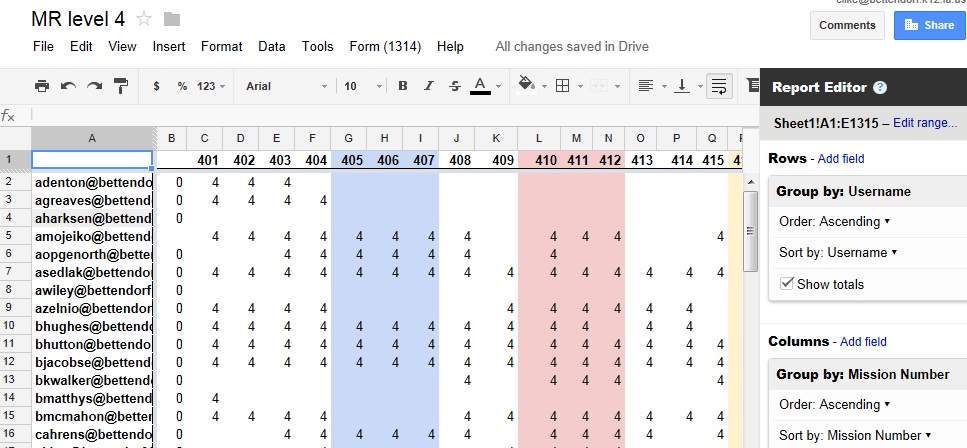
When teachers do a mission, they are to receive points depending upon which level the mission falls under. 4th level missions are worth 4 points, etc. I have to record that they did the mission, assign them the points, and then add up their total points. I do it all in google docs for the simple reason that I am comfortable with spreadsheets, and it's free. Here is how it is done. At the end of every mission, teachers submit a google survey to rate the mission's effectiveness. They have to put their mission number, and the survey records their user name.
This data then goes into a spreadsheet for that level. All 4th level missions have the same form on them. 5th level missions have an identical form that feeds into the 5th level point totals. I then create a column on that sheet that truncates the mission number to the first number. Thus mission 403 will be truncated to 4. This is where the mission number turns into the points awarded. 


I then create a pivot table that accesses this information with the teacher's username, mission number, and returns the points awarded. The final column on the pivot table adds the total number of points for that level. The different colors on the table allow us to keep track of chain missions. If someone does all in a chain, they earn a new title. 
The third worksheet on this document is where the totals are linked to the teacher's actual names. Basically, we have a list of names associated with the users, and an equation copies the total column from the pivot table to this "totals" spreadsheet. The equation used is a VLOOKUP, that looks up their username, and returns their total. 

Now that I have their real name associated with their point totals from that level, I simply copy each of the point totals to a different "Leaderboard" spreadsheet. It has columns for each level, and adds the numbers in the end. The actual leaderboard simply references that sheet and is displayed for the staff. 

Easy peasy.

Let me know if there are any questions. If I get ambitious I may do a video tutorial on how this is done to show you around myself. 

Chris
@christopherlike


Friday, March 15, 2013

Observing a Technology Integration Blog for 1:1

There is a good chance that you are reading this because I put the words "Technology Integration" or "1:1". This is my 26th blog on this site. I have a few followers that I think are pretty loyal to at least opening up the page and skimming it. I also probably have a few lurkers who catch my post on twitter and check out the page if it looks interesting. I also have a few random blog seekers who run across key words I label on the posts. 

Here is the observation I have made. In looking at my posts, I get almost a 300% increase in viewings when the post title includes something to do with technology. Crowdsourcing your 1:1 Professional Development holds the title for the most views, almost tripling any other post. Posts on pedagogy or developing relationships with students get little to no views. Apparently if I want my posts read, I need to place as many buzzwords into the title as possible. 

I believe the reason for this is fairly apparent. Those of you reading this Blog are probably tech-savvy and are interested in learning more about technology. Thus you read the blog posts that deal with your interests. Makes perfect sense. Sites like Zite or Pulse allow you to choose what kind of news you want to read. These types of popular sites are focusing our learning on what we want to know. 

I have a few concerns with this. First off, the more specialized we become, the less rounded. I have seen this on some of the twitter #edchats that I have contributed too. What I have found is that when you get a bunch of us tech minded teachers together in a virtual environment, we do nothing more than preach to the choir. A few weeks ago, the topic of one of the questions on #iaedchat was how do we develop better relationships with our students. Far too many of the responses revolved around giving them iPads or other devices to foster online social networking. Really? I posted that we should talk to them. I believe that many times that the more we focus on the trees, we miss the forest. 

There is something to be said for those liberal arts classes we all took in college. Remember the class on Russian history that you had to take from 6-9PM on Thursday night that you hated because all your friends were at the bar? That class had a purpose. It gives you perspective on something outside your chosen field. I urge you all to check out some blogs outside your interests. Try to broaden your perspective beyond just integrating technology or movie news (which is about all I check). 

Secondly, if the only ones reading these blogs are those interested in technology, we have another problem. We need to try to get the rest of our colleagues to read, to write, to spread their ideas across the nation. There is more out there than tech blogs. You are reading this, but does the teacher across the hall subscribe to these kinds of things? There are a lot of teachers that are resistant to integrating technology into their classroom. Perhaps the first step for that person  is to get them using it for themselves. I would not spend the time writing these pages if I didn't think that they had some kind of value to people. If you made it this far down the page, you must think the same. How can we get your principal, or team teacher to expand out in the same way you have? The more people that contribute to the conversation, the more the forest becomes apparent. 

Thoughts? Post a comment on how or why you came across this blog. It may be informative to see why people put precious time into reading these. 

Chris
@christopherlike

Thursday, March 7, 2013

Crowdsourcing Your 1:1 Professional Development

In an earlier post, I talked about a professional development model that I created for my district based on gamification. We call it Mission Possible, a game-like system where teachers work through "missions" in order to gain achievements to reach higher levels of tech greatness. Read more here! I kind of left you hanging with the second part of the PD that I feel makes it successful.

Crowdsourcing is a big part of the model that individualizes the PD to departments and even specific teachers. I am not sure how Webster defines crowdsourcing, but I can give some pretty good examples.

Astronomers, in an effort to map the sky have taken pictures of millions of galaxies with telescopes like Hubble, or the Keck Telescope in Hawaii. The next step in their experiment was to categorize these galaxies as spiral, elliptical, irregular or peculiar using Hubble's Galaxy Classification system. Basically you would need to look at these pictures, determine if there were spiral arms, or other things happening that would put the galaxy into a certain category. As it turns out humans are much better, even after simple instruction, than computers at doing this. Astronomers had a problem. With the six grad students working on the experiment, they could not look at the MILLIONS of galaxies. They created Galaxy Zoo. This website gives anyone a brief intro to how to classify galaxies, then shows them pics and has them practice. Using some simple questions, they use people around the world to classify actual scientific data. Within 24 hours they were getting 70,000 classifications per hour, using over 150,000 people in the first year.

With Mission Possible, I wanted to have missions that were specific to disciplines around the school. I am not an expert in Foreign Language, so I go to the experts. They can progress in the game by earning points creating missions for others. As part of the game, a teacher creates their own tutorial, shares it with others, and contributes to the actual making of the game.

I believe that this ownership of the game itself is a big part of the buy-in we get from our teachers. It is not a game where I or some Tech God who know everything is telling them what is important to learn in tech. No one knows every application of tech in our school. There are pockets of experts that I am tapping into with the crowdsourcing missions. Teachers realize that the game is theirs to play, and create as they go. The tutorials are there for other's use, which gives the teachers recognition and a part of the satisfaction that I feel in the success of the game.

I know there are a lot of you looking to adapt this model in your own systems. Do not forget the crowdsourcing piece as it will help you with manpower as well as buy-in. Good luck and let me know how it goes.

Chris
@christopherlike

Friday, March 1, 2013

A Teacher's Tech Wishlist

Here is a short list of things that I wish I had in technology that either are not invented yet, not available to me due to price or IT restrictions, or that I simply do not know about yet. If some of these are available, please let me know where I can get them.

  1. An iPad/website testing app that will allow for the following:
    1. Students can not close the app or move to another screen during the test. (I would like exceptions to teacher-allowed apps or websites. I am thinking of a calculator, periodic table, or designated web address)
    2. Multiple questions can be linked to a single passage. Similar to the ACT or any standardized test, you give the students a passage to read, or graph to interpret, and then ask several questions about it. 
    3. The app links with my school's grading program so that the grades can automatically be placed into my gradebook. We have purchased Naiku, which is supposed to do this, but my district will not release our student data for their database due to confidentiality issues
  2. I would like google spreadsheets to be better on mobile devices. They have come a long way but need to be able to graph and do some data analysis like the slope of lines and such. I have recently gotten Appster for google docs and it looks to help with this, but it has been buggy for me. 
  3. A free online textbook for my classes. With the Internet, information is free! Why am I paying so much money for your take on Kepler's Laws? Be careful textbook companies, if this is not done soon, I am going to write my own!!
  4. It would be really nice if java worked on apple products. So many animations in the sciences are made as java applets. With the iPad, we are starting from scratch. 
  5. A student monitoring program would be great for the iPad. With the desktops in my room, I could run a program called Vision that would show me all the desktops in my room in real time. I was able to take over a student's desktop remotely. Can we get something like this for our 1:1 mobile devices? It may cut down on the games being played in class that are eating up our bandwidth. 
I am sure there are more but on a Friday morning, this is all I can come up with. If I think of something else that I would like, I will post it in the comments. If you read this and can help me or have something on your wishlist, please post a comment. 

Chris
@christopherlike

Tuesday, February 26, 2013

Power Point kills presentations

I don't know about you, but I would rather dance Gagnam Style barefoot on broken glass than watch another student power point presentation. The sight of the "Sunny Days" background with its creepy coppery solar smile makes my skin crawl. Sitting in the back of a semi-dark room listening to students read plagiarized material from Wikipedia while mispronouncing most of the words they don't know is about enough to make me give up teaching. Don't get me wrong, Power Point is a powerful tool when used correctly, but in the wrong hands, it can spell catastrophe for even a good presentation.

Here are my top 5 reasons for hating this program and all of its offspring.


  1. Presentation software is overused. It was cool in 1995 when a teacher could throw away their overhead projector and replace it with stunning pictures and swooshing text. After we all got over the fact that we could link sounds to our magically appearing text the program lost all its appeal as a novelty. Most of the features that these presentation software packages offer (sounds, backgrounds, transitions, etc) are more annoying than helpful. 
  2. Power point has become the presentation. If I wanted information in a file, I wouldn't ask you to present, I would read it on the Internet. A presentation demands a presenter. I want to see you present, as an expert in the subject. I want to hear the presenter, not read what they wrote. Students especially, spend too much time making the visuals for the presentation and no time practicing their delivery. I remember standing in my room with my outline practicing the presentation that I was going to give to my high school biology class. I would practice it with my family at night, not spend all my time putting everything I wanted to say on the computer and then read it to the class. 
  3. Power point is a crutch for not learning the material. Why should a student know what they are talking about if it is written up there for the class to see? They are not becoming experts in the subject, able to answer questions about their presentation. They are becoming readers of someone else's information. 
  4. Power Point dumbs down the world. I read an article a few years ago where a General in the Gulf asked his staffers how they spent most their time. They replied almost verbatim "I have been working on a power point for Friday's meeting." He realized that this was becoming a problem. You can not simplify war into bullet points. Something as complex as the war on terror can not and should not be simplified into three points on a slide. I am a firm believer in this. If we are trying to get kids to see connections in ideas, go deeper into concepts and ideas, how can then ask them to bullet their thoughts. Power point compartmentalizes ideas into slides and a timeline. Life is not that linear. 
  5. Students don't take notes anymore. They can always go get my power point online if they want the information. I can tell you this because I do this. If I am at a conference and the presenter gives a power point. I will be checking my email within 3 minutes of the start of their presentation. Many times the presence of the power point is a crutch for me as a learner just as much as it is for the presenter. Why do I need to listen if everything you said is on the file?
Don't get me wrong, when used correctly, power point can be a powerful tool. I am only saying that most of the time it is used linearly and with too many words. Show me pictures that add to what you say or enhance your presentation. Make it non-linear, mapping a web of pages that allows me to navigate it to where I want to go. If you are presenting, look at me, talk to me, make me believe that you know what you are talking about. If you don't I will tune out, probably roll my eyes, and be on twitter in seconds. I am no different than our students. 

We talk a lot about getting our students to write well. We worry about their grammar and spelling, their punctuation and their ability to express themselves in writing. How is it that we have no problem taking points off an essay if a student doesn't express himself correctly but if he gives a crappy presentation, we clap and score them on at least having the power point. We need to focus on presentation skills in class, holding students accountable for a poor performance. I read once that the fear of standing in front of their peers and presenting ranked right before the fear of death on some survey. Students need to know how to present, need to be comfortable in front of others, and have the skills to do so. 

As always, your thoughts are appreciated,

Chris
@christopherliketech

Wednesday, February 20, 2013

Mission Possible: Playing Games with Professional Development

A few posts ago, I talked a bit about Gamification in education. I then went on to discuss an idea I had to apply this to my classroom with Galaxy Fleet. After presenting at last weekend's Iowa Edcamp, I am inclined to give you some specifics of the Professional Development model I created that uses these principles.

Mission Possible is our district's model for professional development with regards to technology in our 1:1. In creating this process, I was looking for something that was highly engaging (or as engaging as any PD can me) as well as individualized and fun. Teachers were coming into our 1:1 initiative at many levels. We had those who could not wait to get their hands on their iPads, and those that never planned to take them out of the box. I needed a system that would challenge the high flyers while bringing those indifferent to the technology into the fold.

I see learning technology to be three fold. First there has to be a time where you simply get comfortable using the device or programs. In the game, this is where teachers begin. Level 1 teachers are given the title "Noob", a distinction that they no doubt want to shed as soon as humanly possible. Upon reaching level 3 in the game, they are considered "Users". I see users as teachers who are not afraid to turn on a computer or device and use it, but may not know exactly what to do with it. They want to play with different apps, find already developed programs to use, and master them. User levels (3-6) are where most of our teachers currently sit after about a year into the program. Upon reaching level 7, we start referring to teachers as "Tech Geeks". These people are comfortable finding apps and using them. They don't need any more in-service on what is out there or how to find it. Their levels shift to how they are going to implement these strategies into their classes. They collaborate with other Tech Geeks to infuse the technology or they share their expertise with others by leading sessions on in-service days.

Those are the three Tiers of the game. The mechanics follow real basic gamification principles. To gain a level, teachers do "Missions." Missions are set to take about 15 minutes each. A level 1 mission earns the teacher 1 "Paw Point" (we are the bulldogs). Once they reach 10 paw points, they lose the noob status and become a level 2 novice, on their way to being a User. Level 2 missions are worth 2 paw points each, level 3 worth 3 and so on. Teachers are not allowed to do missions above their level, but can "farm" lower level missions for small amounts of paw points.

Here is the website for the Game. 

You will not be able to see the leaderboard, which we do post so everyone knows where they stand. At the onset of the game I made a couple of things very clear with both the teachers and the administration. First, this is NON-EVALUATIVE. At no time will an administrator come to them and ask why they are only 5th level. I am a firm believer you get from Professional Development what you put into it. The only requirement that teachers have in the game is that whenever they are given time to do missions, that they put forth their best effort. Second, the game is really on the honor system. No one is going to be standing over their shoulder watching them do missions. Again, you get out what you put in.

I can tell you that this posting of the leaderboard is a key to the game aspect of it. It engages teachers' competitive nature just like Call of Duty does with my eldest son. The guy at the top will not let others ahead of him, even though they try. Some don't want to be at the top, but they always want to be ahead of that person right above them. The level of interest has dwarfed my expectations.

As teachers move through the game they can pick up other titles along the way for completing sets or "chains" of missions. If a teacher does a set of 5 missions on twitter, we give them the title "Twenius" on the leaderboard. This allows others to see who are experts on programs they might be interested in. They can seek them out instead of the tech department.

I encourage you to develop your own game based on this model. I am not selling the idea, I am giving it. Use it, make it yours. In doing so, I can give some advice. Keep it light; keep it fun. Name the missions with cute names like "Mickey Mouse is Pissed" for copy write, or "How do I put my face on Jennifer Lopez's body" for paint programs. Put effort into selling it to admin before the teachers. Time is always the biggest issue. Some teachers will do missions at night while sitting in bed, but most will only have time to do them when given it by admin. Be sure you have their support before selling it to the teachers. Celebrate successes. We always tweet out when someone raises a level. We have given prizes like earbuds to everyone who hits 5th level, or stylus's to the first 5 who hit 7th level.

Crowdsource the making of the missions to your teachers. Upon reaching level 7, teachers are beginning to help in making the actual missions, or ratifying earlier missions to make them better. I do not have the time or expertise to make missions for apps in all the different disciplines in my school. I let others do the work for me. I can post more on this later, but it is a big part of what makes Mission Possible actually possible.

As for the back end to this, I did it in Google forms and spreadsheets. Why? They were free and I kind of knew how to use them. If a programmer reads this and wants to write a database that keeps better track of these things, please do and share it with me. If you are interested in seeing the data side of this, please let me know and I can post something on that later.

That is an overall look at the game. I have presented this at a couple of conferences and can tell you that the idea is spreading like the clap at Woodstock. Grant Wood AEA is trying to develop something, I have had talks with the Des Moines School District, as well as Dubuque AEA and several smaller districts.

Let me know if there is any way I can help in these or other endeavors with this idea.

Chris
@christopherlike

Tuesday, February 12, 2013

iPads in my Classroom

My district is in the midst of transitioning to a 1:1 system where every student will be given an iPad for use in and out of the classroom. This current year, all of our freshmen and sophomores were given the devices. Next year, the incoming freshmen will be given them and the following year all students will have the device. I would like to take an honest look at the initiative and hopefully give you all some advice on making the transition. I will preface this by saying that I am NOT an Apple junkie. As a matter of fact, I have always leaned towards the Google/Android system for its openness and flexibility.

Currently, as I teach mostly upperclassmen, my opinions are on the fence with the iPad. I have not been able to integrate it like I plan on doing in the next few years as many of my students do not have the device. Lets focus on the Good, the Bad, and the Ugly.

The Good:

There are several appealing attributes to the iPad as the device of choice for a 1:1.

  1. The iPad allows for innovation. I visited a school in Chicago that was using Chromebooks for their 1:1. They were very excited about how they were using Google Docs and various websites in their classes. That was great and all, but I did not see anything being done that we were not already doing in my building. They were doing what they did before, only with a computer. Their worksheets were electronic, and the kids handed things by sharing the document electronically with the teacher instead of putting it in the wire basket. That is great, but it is not innovative. The iPad, with its camera and mic, its movie editing apps, its simulations and quiz taking apps allows for a much broader spectrum of capabilities in the classroom. With the iPad, we could not just do what we did before without paper, we can do more. 
  2. Kids think its cool. Sure there is a novelty to every technology, but with the iPad the students are still buying into its marketing. Put a cheap netbook in a kid's hand and they will say thanks, but give them this tablet and watch their face light up. Although silly, this can not be overlooked. 
  3. iPads don't break that easily. Actually they do, but we bought a pretty good case for them that protects them from being dropped and such. At a 1:1 conference I attended, people were telling me that we should expect 20% breakage of the device. I think we are like 1% in my school. Why? The iPad doesn't have a hinge or any moving parts. Most of the breaks to 1:1 devices are on the laptop hinge or some kind of moving part. Perhaps we have just been lucky!
  4. Battery life was a major factor in going to the solid state system. Most laptops have a 4-6 hour battery life, which would not get a kid through a day. Then think about three years down the road on how good that battery will hold a charge. If your school goes with a netbook or something like that, be prepared for cords spiderwebbing your floors. 
  5. The App Store is immense. If you can't find what you are looking for, it doesn't exist. People write apps for the iPad as its popularity is unmatched. 

The Bad:

Before you all believe that I am taking commission from Apple for writing this, I do have some serious problems with the device. 
  1. The iPad is not a production tool. I want my kids to produce documents from scratch that show me what they have learned. Frankly, the iPad sucks at this. My district is not going to shell out funds for every student to have Numbers or Pages at $10 each, so we are stuck with mostly free apps like Google Drive. The lack of keyboard is a huge issue in writing. It is hard to ask a student to write a research paper on this thing by typing with their thumbs. Kids are amazing at doing that, but it is not something they want to do for long periods of time. 
  2. Google Drive is not there yet for the iPad. The Drive App now allows you to save things offline, which is great, but their spreadsheets, search tools for finding contacts, and their ability to make a copy of the original for editing is way behind. I am confident they will catch up, but they are not there yet. Other teachers I know have tried Evernote and Dropbox, but neither of them allow for spreadsheets of data or graphing. Right now, I am still using my desktops for most of the actual classwork production. Students prefer it that way. 
  3. iPads do not support Flash. All of the cool simulations that have been written in the last decade are on the Internet using flash player or shockwave. In trying to keep Adobe out of its marketshare, Apple has handcuffed teachers of the tools they have been using for decades. New sims are not out there yet. 
  4. ITunes U is not what it promised. When we made the decision for the iPad, ITunes U and ITextbooks were just coming out. They were supposed to revolutionize education, but really are nothing more than slimmer versions of Edmoto and Blackboard. I don't know why anyone would write an ITextbook that is only available on the iPad. If I were doing all that work, I would do it in HTML so it could be used on any device. 
  5. Testing is a nightmare. We are looking at Naiku, a testing website that will allow students to take exams online. This is very promising but has its limitations. We need an app that will not allow students to leave the app while taking the exam. I can Google answers to the question by copying the text into the Google taskbar in Safari or Chrome. Apparently there is a part of the Naiku site that tells the teacher if the student is off task, but nowhere does it stop a student from taking a screenshot of the questions and sharing it with their friends. 
  6. I don't know where any of my files are! The Apple operating system stores your data in some magical place on the iPad that is specific to the app. On my Android phone, I can save documents to "My Files" and then retrieve them, move them, rename them, and download them to a computer. With my iPad I have to trust in the software to know what I want to do with a file and have the capability to do it. I am often disappointed in what I am not able to do. 
  7. Apps are not programs. Perhaps this is the wave of the future, but the apps that are out there are nowhere near as full-featured as the programs they stemmed from. Microsoft Word can mail merge, add images, tables of data from excel, wordart, and a million other things that no app can even come close too. If you want to add wordart, you need to find an app that is specific to that, and that will interface with the word processing app you are using. 

The Ugly:

The Ugly truth is that and 1:1 initiative, whether it be iPad, Chromebook, Netbook, or Laptop is only as effective as the teachers implementing it. We have several teachers in our building who were all over this initiative, thinking up innovative ways to use the device, downloading apps, and completely rethinking how they teach. I applaud them, but give them caution. The device should not dictate curriculum. It is a tool, nothing more. Sound teaching practices should come first. In science, I will not add an app if it does not fit into the methods in which I teach. It needs to foster inquiry and problem solving in a way that I can not do without it. I am excited to see what I can do with the device, but will not let it dictate my lessons. 

We also have many teachers reluctant or scared to use it. To them I say give it a chance. You may not find the prefect app for your lesson, but think about the abilities students can utilize in taking notes. You can now assign a video as homework instead of watching it in class. Simple formative assessments can be very powerful and easy to implement. It may not be a centerpiece of your classroom, but I believe there is a place for it. 

I would love to hear any of your thoughts. 

Chris
@christopherlike